
How I Built My Developer Portfolio with Next.js 16, MongoDB & Framer Motion
A deep dive into building a modern, full-stack developer portfolio from scratch — featuring a custom CMS, real-time analytics, recruiter mode, mini-games, and a polished dark UI.
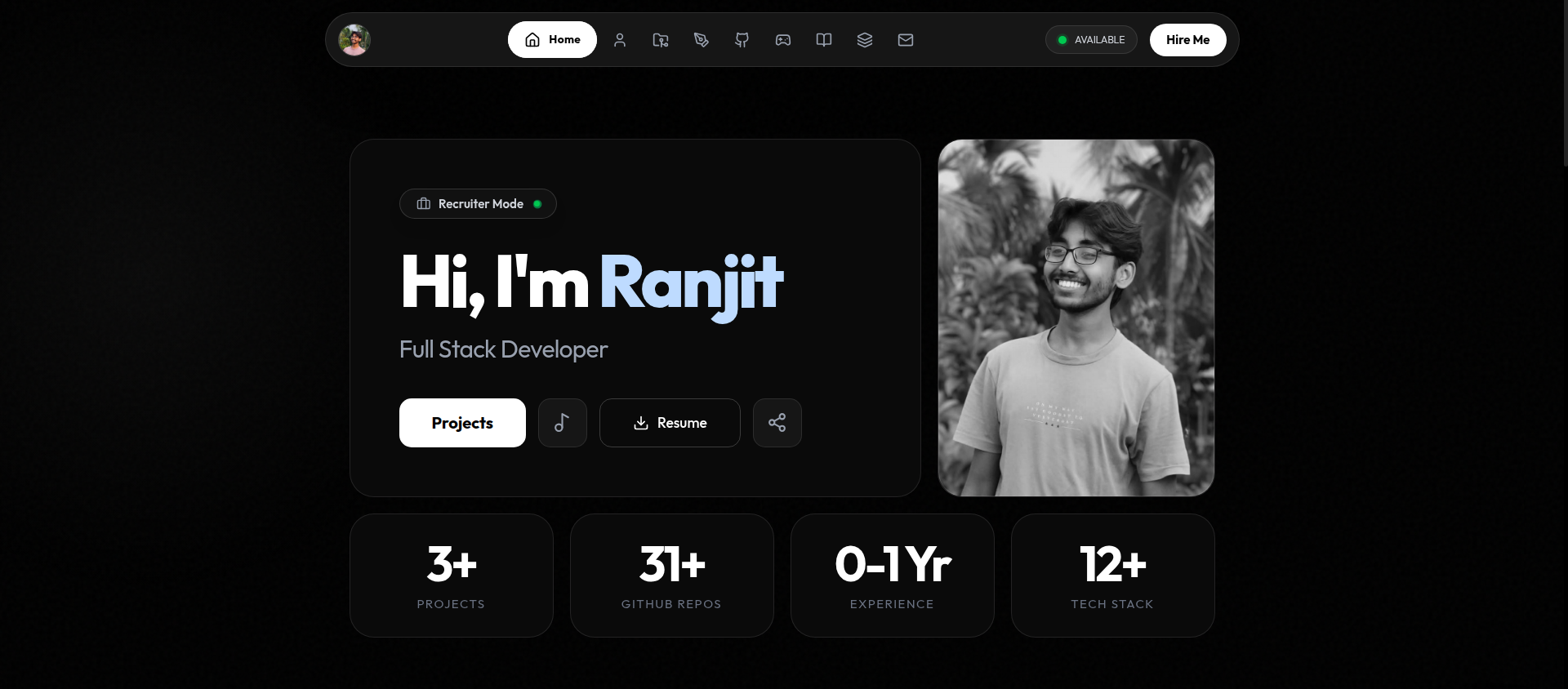
Building a portfolio that truly represents your skills as a developer is one of those projects that never feels "done." But after weeks of iteration, I shipped ranjitdey.in — and I'm genuinely proud of how it turned out.
In this post, I'll walk through the architecture, design decisions, and features that make this portfolio stand out.
The Tech Stack
I chose a stack that balances developer experience with production performance:
- Next.js 16 (App Router + Turbopack) — Server components, server actions, dynamic rendering
- TypeScript — Type safety across the entire codebase
- MongoDB Atlas + Mongoose — Flexible document storage for content, analytics, and settings
- Tailwind CSS 4 — Utility-first styling with custom design tokens
- Framer Motion — Spring-based animations that feel alive
- Vercel — Zero-config deployment with edge functions
The Admin Panel
Instead of using a headless CMS, I built a custom admin panel from scratch. This gives me full control over the content pipeline:
- CRUD for everything — Blogs, projects, resources, about section, and site settings
- MongoDB-backed authentication — Passwords hashed with
crypto.scryptSyncand timing-safe comparison - Image uploads — Dual storage with Cloudinary and Supabase
- Analytics dashboard — Real-time visitor tracking with charts (Recharts), filterable by OS and country
The admin panel is protected by middleware-level authentication. Every /admin/* route checks for a valid session cookie before rendering.
Visitor Analytics — Built from Scratch
One of my favorite features is the analytics system. Instead of relying on Google Analytics or Plausible, I built a custom tracker that respects privacy while giving me useful insights:
How it works:
- A client-side
AnalyticsTrackercomponent sends a beacon to/api/analytics/trackon page load - The API extracts the visitor's IP, geolocation (via ip-api), browser, OS, and device info
- All sessions from the same IP are grouped into a single record with a
visitCountfield - Time spent, scroll depth, and click interactions are tracked per page via
sendBeacon
In the admin panel, each visitor card shows how many times they've visited, and clicking reveals all sessions with page-by-page timelines.
I also filter out unknown device types (bots, crawlers) to keep the data clean.
Recruiter Mode
As a developer actively looking for opportunities, I added a "Recruiter Mode" — a single-click modal that shows everything a recruiter needs:
- Profile photo + name
- Quick bio
- Direct contact links (Email, LinkedIn, GitHub)
- Experience summary
- Tech stack at a glance
- Resume download button
It's designed to save a recruiter's time. No scrolling through pages — everything is right there.
The Playground
To show personality beyond code, I built a Playground section with four mini-games:
- 🐍 Snake Game — Classic snake with score tracking and touch controls
- ❌ Tic Tac Toe — Play against the computer
- 🃏 Memory Match — Card-flipping game with timer
- ⌨️ Typing Speed Test — Real-time WPM and accuracy
All games use dynamic imports to avoid bloating the main bundle. They're fun, and they showcase state management and canvas/DOM manipulation skills.
Command Palette
Power users can press Ctrl+K (or ⌘+K on Mac) to open a command palette — inspired by VS Code and Raycast. It lets you quickly navigate to any page with fuzzy search.
Design Philosophy
The design follows a dark monochrome aesthetic with glassmorphism elements:
- Pure black (#000) background with subtle SVG noise texture
bg-[#0a0a0a]cards withborder-white/10borders- Glassmorphism via
backdrop-blur-xl - Cursor glow effect that follows mouse movement
- Google Fonts: Outfit for headings, JetBrains Mono for code/labels
Every hover state, transition, and animation is intentional. The goal is to make the portfolio feel premium — not like a template.
Performance Optimizations
Some key decisions for performance:
- Dynamic rendering — All data-fetching pages use
force-dynamicto always serve fresh content unstable_noStore— Applied to server actions to prevent Next.js from caching stale data- Proper cache invalidation — Every CRUD operation revalidates the exact affected paths
- No static generation for DB content — Prevents the classic "deleted content still showing" bug
- PWA support — Service worker for offline capability and faster repeat visits
SEO
SEO is baked in from the start:
- Dynamic
generateMetadataon every page - Open Graph + Twitter Card meta tags
- JSON-LD structured data (Person schema)
- Auto-generated
sitemap.xml - RSS feed at
/feed.xml - Canonical URLs on all pages
What I Learned
Building this portfolio taught me a lot about the Next.js App Router's caching behavior. The biggest gotcha? generateStaticParams creates pages at build time that become stale — if you delete content from the database, the old pages persist until the next build.
The fix: use dynamic = 'force-dynamic' and unstable_noStore for any page that reads from a database. It's slightly slower than ISR, but the data is always correct.
Wrapping Up
This portfolio is more than a showcase — it's a full-stack application with authentication, a CMS, analytics, and real-time features. Every line of code was written by hand, and every design decision was intentional.
If you're building your own portfolio, my advice: don't use a template. Build it from scratch. The process itself demonstrates more about your skills than any resume ever could.
Check it out at ranjitdey.in 🚀